



QR Code Wedding Invitations: How to RSVP Online

QR code wedding invitations let guests RSVP by scanning a small printed code that opens your wedding website or RSVP form. They save reply-card postage, keep every answer in one list, and are now accepted etiquette. Test the code on several phones, and offer a phone number for guests who prefer not to scan.
If you're weighing paper reply cards against a QR code, this guide covers what it costs each way, how to make a code that scans every time, where to put it in your suite, and when your RSVP deadline should land.
What are QR code wedding invitations?
A QR code wedding invitation is a traditional printed invitation with a scannable square code on it, usually on a small RSVP card. A guest points their phone camera at the code and lands on your RSVP page, where they reply, choose a meal and leave a note. There's no reply envelope to lose and no stamp to buy.
The code can open anything with a web address: your wedding website, an RSVP form, your registry, hotel blocks or a map to the venue. For invitations, most couples point it at the RSVP page and put everything else on the website.
Is it proper etiquette to RSVP with a QR code?
Yes. The Knot says it's fine to go paperless for RSVP cards, and its Real Weddings Study found that 8% of couples used digital-only RSVPs while 19% offered both print and digital options (The Knot).
The same article gives one caution worth taking seriously: older guests may not be comfortable replying online. Its suggested middle ground is to offer both a digital and a paper option, or to add a phone number so guests can call or text their reply.
How much does a QR code RSVP save?
The biggest saving is postage. A traditional reply card travels with its own stamped return envelope, so you pay for one extra stamp per invited household. Since July 12, 2026, a 1-ounce First-Class stamped letter costs $0.82 (USPS Price List Notice 123).
| Invited households | Reply-envelope stamps at $0.82 | With a QR code RSVP |
|---|---|---|
| 50 | $41 | $0 |
| 100 | $82 | $0 |
| 150 | $123 | $0 |
Those figures cover stamps only. You also skip printing and buying the reply envelopes themselves. One more postage note for the outgoing invitation: USPS adds a $0.49 nonmachinable surcharge to letters that meet its nonmachinable criteria (same notice). Square envelopes are a common example, so weigh and measure one finished invitation at the post office before buying stamps.
How do you make a QR code for a wedding RSVP?
- Set up the RSVP page first. Use your wedding website's RSVP feature or a simple online form. Ask for names, attendance, meal choice and dietary notes.
- Use a link you control. Point the code at your own wedding website rather than a long form link. If the form ever changes, you update the website, and the printed code keeps working.
- Generate the code in high resolution. Download it as an SVG or a large PNG so it stays sharp when printed (Jotform).
- Keep the contrast high. A dark code on a light background scans best. Avoid gradients and pale colors.
- Label it. Add a short line such as "Scan to RSVP," plus the website address written out for anyone who prefers to type.
- Test it before you print. Scan it on an iPhone and an Android phone, in bright and dim light, from a printed test copy, not just your screen.

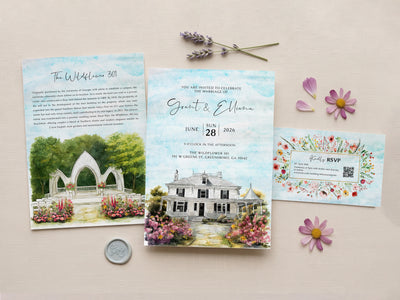
Want the code to sit on a card that matches your venue? The I-Catcher Complete 3-Card Suite includes a 3×5 QR-code RSVP card alongside your venue invitation and venue history card.
Where should the QR code go on your invitation suite?
You have three good options:
- A separate RSVP card. The classic layout. The invitation stays clean and formal, and the small card carries the code, the deadline and the website.
- The back of the invitation. Saves a card, but guests may miss it. Add a line on the front such as "RSVP details on the back."
- The details card. Works if you already include a card for hotels and directions.
Whatever you choose, print the RSVP deadline right next to the code. A code with no date invites guests to answer "later."
When should the RSVP deadline be?
The Knot recommends an RSVP deadline about three to four weeks before the wedding, and no later than two weeks before (The Knot). That gives your caterer and venue final numbers in time.
Invitations are usually mailed 6 to 8 weeks before the wedding, so guests get roughly three to five weeks to reply. A quick reminder text a few days before the deadline catches most stragglers.
How do you plan the timeline for printed QR code invitations?
Here's how the timing works for printed I-Catcher invitations, based on our current shipping policy:
| Step | Time |
|---|---|
| Hand-drawn venue sketch | 2 to 3 business days after we have your photo or venue link |
| Watercolor-style proof with your wording typeset | 3 to 5 business days after you approve the sketch |
| Printing | 12 to 15 business days after you approve the proof |
| Free tracked US shipping | 5 to 9 business days |
| Total | About 7 weeks, so order at least 12 weeks before your wedding |
Printed orders ship to US addresses only. Digital files are emailed as soon as you approve your proof, so you can also print locally or send the invitation by email. You can read the full process on our How it Works page.
What does a QR code invitation suite cost at I-Catcher?
| Option | Digital file | Printed (from 50 cards) |
|---|---|---|
| Single invitation card | $130 | From $260 |
| Complete 3-Card Suite with QR-code RSVP card | $200 | From $430 |
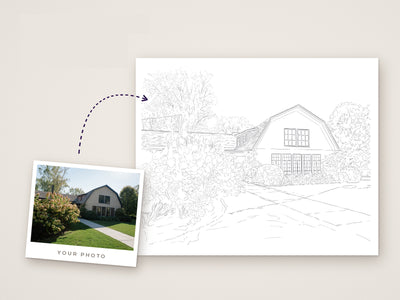
Every venue is hand-drawn by our artist in Photoshop with a digital pen, in a watercolor style, never AI. You pay a $35 deposit at checkout, and the balance is charged only after you approve your final proof. Not sure yet? Start with a $35 venue sketch, which is refunded in full if you don't approve it after revisions. You can see finished venues in our art gallery, and our guide to venue illustration invitations explains which photos to send.
QR code wedding invitations FAQ
Do I still need RSVP cards if I use a QR code?
Not if your guests are comfortable online. The QR code can sit on a small RSVP card, the back of the invitation or a details card. Offer a phone number or a few paper cards for guests who prefer them.
Will a QR code expire?
A basic code that points to a fixed web address keeps working as long as that address works. Pointing it at your own wedding website keeps you in control if anything changes.
How big should the QR code be?
Big enough to scan easily from a printed card. Generate it in high resolution, keep it dark on a light background, and test a printed copy on more than one phone before you approve the proof.
Can older guests RSVP without scanning?
Yes. Print the website address under the code and add a phone number, as The Knot suggests, so anyone can reply by typing, calling or texting.
Can I add the QR code to a digital invitation?
Yes. With a digital file you can email the invitation, and guests can tap your website link instead of scanning.
Ready to put your venue and your RSVP code on one suite? Start your custom venue invitation and send any photo, address or link to begin.